
First Look: Sync Embeds Plugin
A new Obsidian plugin does one thing, and I immediately adopted it.

I came across the new sync embeds plugin recently. From the repo:
Sync Embeds transforms standard Obsidian transclusions into live, editable, two-way synced blocks. Edit any note (or specific header section) directly from where you embed it, without ever needing to open the source file.
Trusted by over 15,000 users, it’s designed to feel seamless, stable, and completely native to the Obsidian experience.
This plugin provides functionality I once relied on Make.md for, though that plugin became too unwieldy for me.
Here’s the use case: imagine you would like to see your monthly and weekly Periodic notes at the head of your daily notes, and you want to edit them in place.
Here’s what that looks like in a daily note:
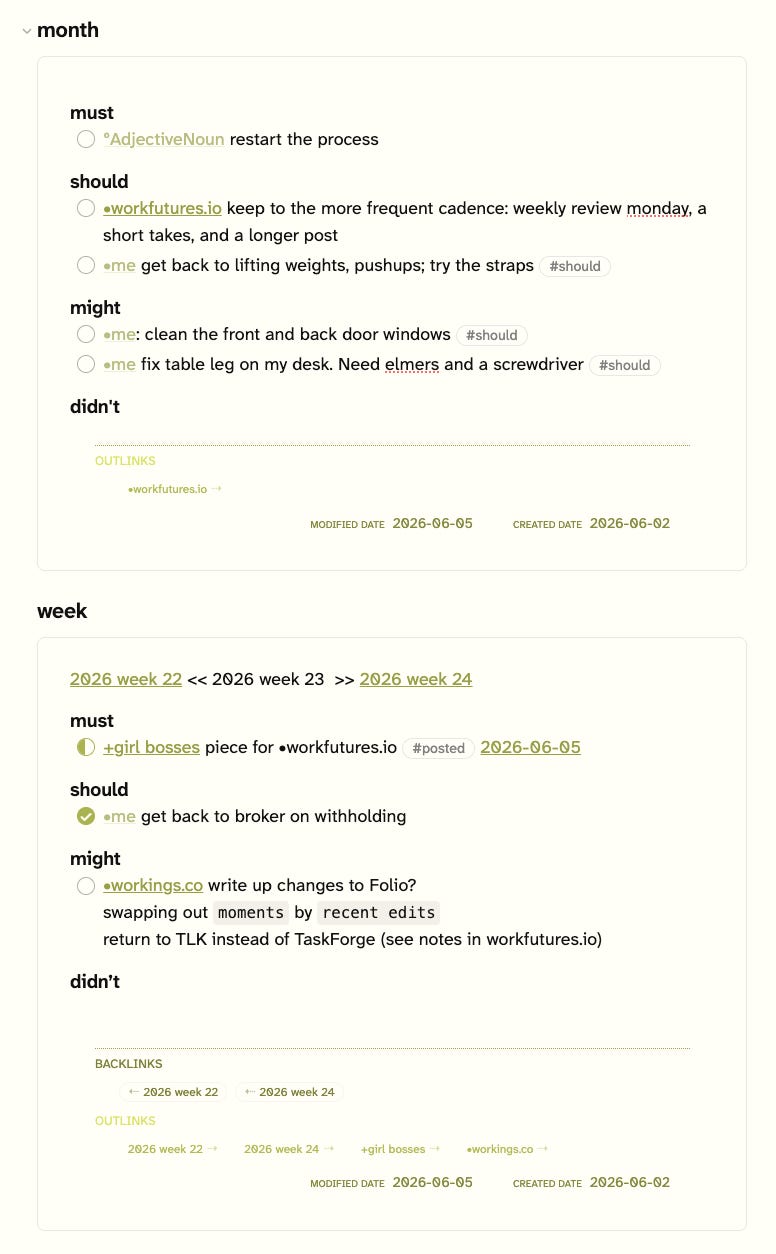
Previously, I used a standard Obsidian transclusion, which did not allow direct editing of the transcluded note. Now, I can edit the Weekly and Monthly notes in all of my Daily notes.
As I have seen so commonly, you have to dig to find out how it works. You a/ have to install the plugin, and then b/ do the detective work to discover how to tweak a transclusion to act as a sync embed. The source code is this, for the Weekly and Monthly notes transclusions:
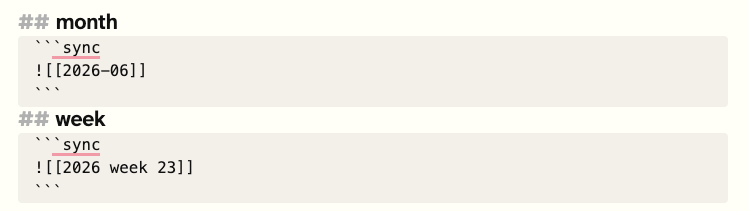
So, a standard transclusion in a code block.
To get it all to work, I tweaked the Daily note template to generate the appropriate references to the Monthly and Weekly notes:
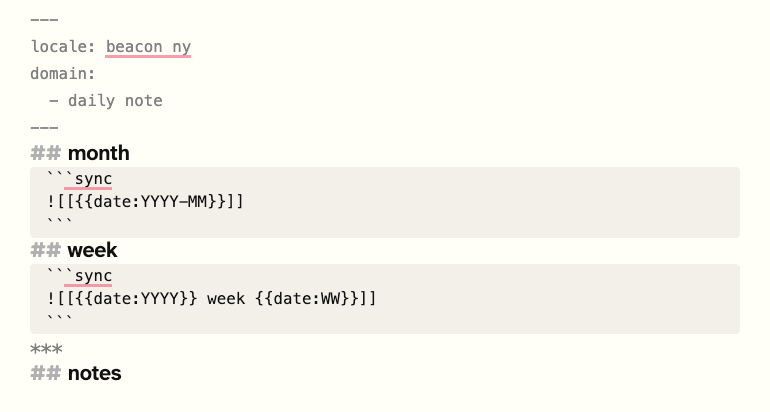
And so now, each Daily note includes an editable window for both Monthly and Weekly notes.
Conclusions and Takeaways
I have only recently started using Sync Embeds and this is the only use case I have implemented. I can imagine other use cases, like when I reference a note B in note A while researching a story I’m working on. But I haven’t gone down that rabbit hole yet.
The Sync Embeds settings include a wide range of examples, including the means to override general settings on a per embed basis. Here’s an example, with various control variables:
```sync
![[Long Note|Compact View{height:300px}]]
![[Reference|Full Height{maxHeight:none,title:false}]]
```
I have yet to play with those features.
A few quibbles:
Sync Embedsdoesn’t always play nice with other plugins. For example, in the screen capture of the Monthly and Weekly notes inclusion you can see theRich Footdata at the foot of each transclusion: the backlinks, outlinks, and dates. However, the next time I opened that Daily Note the Rich Foot information wasn’t showing, and I can’t seem to get it back, even after a restart. However, it reappears if I add a footnote to the note. Not a critical issue, but makes me wonder if I will discover other issues.I don’t know if it’s possible to display the transcluded blocks in reading mode. They don’t change when I change the Daily note to reading mode.
There is no fast way to open the source note in a transclusion. Would be good to include a means to do that, for example, if I wanted to change the note’s name or properties.
